🎉 Up to 70% Off Selected ItemsShop Sale
Select Size
From $47.55
Dexcom ONE+ Sensor—
$47.55
The Story
Dexcom ONE+ Sensor
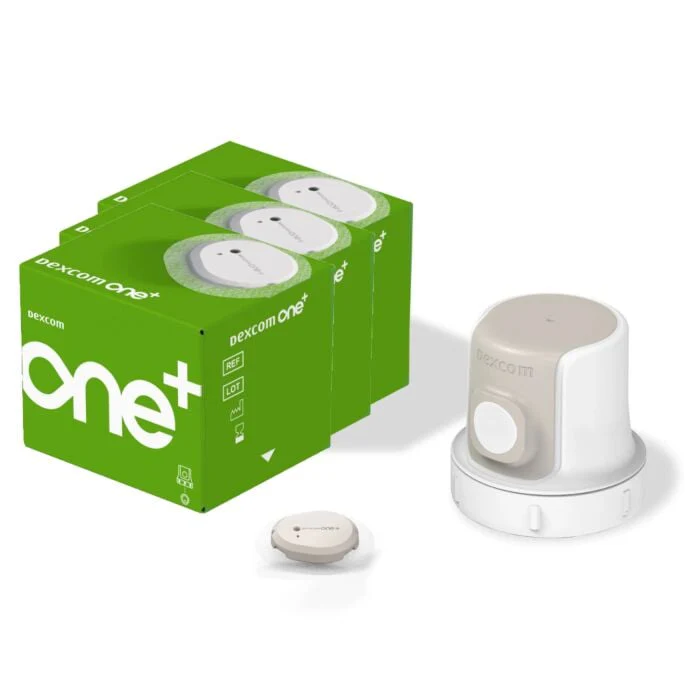
The Dexcom ONE+ Sensor is an advanced continuous glucose monitoring device designed to help individuals manage their diabetes effectively. It provides real-time glucose readings and alerts, allowing users to take proactive steps in their health management.
How to Use
- Prepare your skin by cleaning the area where the sensor will be applied.
- Carefully remove the backing from the adhesive pad of the sensor.
- Press the sensor firmly against your skin, ensuring it adheres properly.
- Follow the manufacturer's instructions to connect the sensor to your compatible device.
- Monitor your glucose levels as per the recommended schedule for optimal management.
Directions
- Use the sensor as directed by your healthcare provider.
- Ensure the sensor is properly calibrated according to the instructions provided.
- Regularly check for updates and settings adjustments on your connected device.
Side Effects
Some users may experience:
- Skin irritation or allergic reactions at the application site.
- Inaccurate readings due to sensor malfunction or improper placement.
- Discomfort during sensor insertion.
Warnings
- Do not use the sensor if you have a known allergy to any of its components.
- Consult your healthcare provider if you experience any adverse reactions.
- Do not rely solely on the sensor readings for managing your diabetes; follow your healthcare provider's recommendations.
Storage Information
- Store the sensor in a cool, dry place away from direct sunlight.
- Keep the sensor at room temperature before use.
- Do not freeze or expose it to extreme temperatures.
Description
Dexcom ONE+ Sensor
The Dexcom ONE+ Sensor is an advanced continuous glucose monitoring device designed to help individuals manage their diabetes effectively. It provides real-time glucose readings and alerts, allowing users to take proactive steps in their health management.
How to Use
- Prepare your skin by cleaning the area where the sensor will be applied.
- Carefully remove the backing from the adhesive pad of the sensor.
- Press the sensor firmly against your skin, ensuring it adheres properly.
- Follow the manufacturer's instructions to connect the sensor to your compatible device.
- Monitor your glucose levels as per the recommended schedule for optimal management.
Directions
- Use the sensor as directed by your healthcare provider.
- Ensure the sensor is properly calibrated according to the instructions provided.
- Regularly check for updates and settings adjustments on your connected device.
Side Effects
Some users may experience:
- Skin irritation or allergic reactions at the application site.
- Inaccurate readings due to sensor malfunction or improper placement.
- Discomfort during sensor insertion.
Warnings
- Do not use the sensor if you have a known allergy to any of its components.
- Consult your healthcare provider if you experience any adverse reactions.
- Do not rely solely on the sensor readings for managing your diabetes; follow your healthcare provider's recommendations.
Storage Information
- Store the sensor in a cool, dry place away from direct sunlight.
- Keep the sensor at room temperature before use.
- Do not freeze or expose it to extreme temperatures.